Microsoft Fabric Training in Hyderabad
DABI offers industry-oriented Microsoft Fabric Training in Hyderabad with a comprehensive 60-day program. Learn OneLake, Data Factory, Data Engineering, Data Warehousing, Real-Time Analytics, and Power BI integration through hands-on projects. This course prepares beginners and professionals for high-demand cloud data and analytics careers with practical, job-ready skills.
For more Info: +91 8309431893
Sign up for a Free Demo
HIGHLIGHTS


A comprehensive course covering from foundational knowledge to advanced topics


We’ll ensure your resume effectively showcases your expertise to potential employers.

We share your Resume to potential employers while we provide Career guidance, Mock interviews & more
MODULES COVERED
What is Microsoft Fabric?
Microsoft Fabric is an all-in-one data analytics platform from Microsoft that unifies data engineering, data integration, data warehousing, real-time analytics, and business intelligence within a single SaaS solution. Powered by OneLake for centralized storage, it allows seamless connectivity to multiple data sources and supports end-to-end data workflows. With built-in Power BI integration, AI-driven insights, and scalable cloud performance, Microsoft Fabric enables organizations to simplify data management, enhance collaboration, and make faster, data-driven decisions.
Why learn Microsoft Fabric training in Hyderabad?
In today’s data-driven world, mastering modern data platforms is essential for professionals across industries. Microsoft Fabric, Microsoft’s unified data analytics platform, is transforming how organizations manage and analyze data. Here’s why learning Microsoft Fabric can significantly boost your career:
All-in-One Platform: Microsoft Fabric combines data engineering, data integration, data warehousing, real-time analytics, and business intelligence into a single SaaS solution, eliminating the need for multiple tools.
Seamless Microsoft Integration: It integrates smoothly with Power BI, Azure, Excel, and other Microsoft services, making it ideal for organizations already using the Microsoft ecosystem.
Centralized Data with OneLake: OneLake provides unified storage, simplifying data management and improving collaboration across teams.
Real-Time & AI-Driven Analytics: Fabric supports real-time insights and advanced analytics powered by AI capabilities.
Scalable & Cost-Effective: Built on the cloud, it offers scalable performance with simplified pricing.
Microsoft Fabric Course in Hyderabad at DABI Training Institute
For those looking to become Microsoft Fabric experts, DABI Training Institute in Hyderabad offers comprehensive training programs. Our course covers fundamentals to advanced concepts, including Data Factory, Data Engineering, Data Warehousing, and Power BI integration, ensuring you gain practical, industry-ready skills.
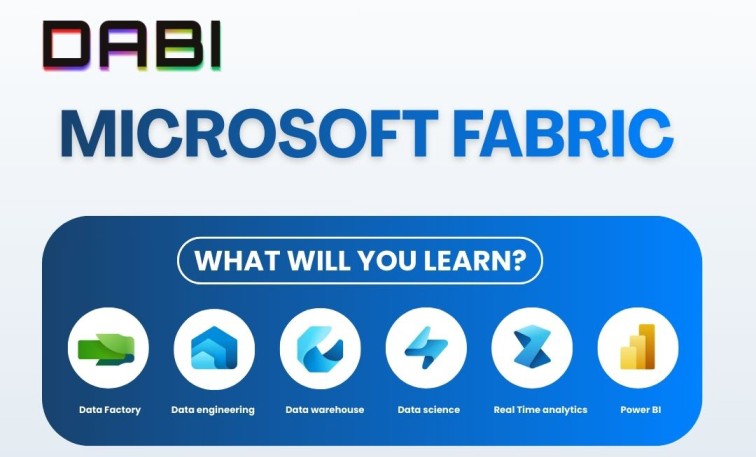
What Will You Learn in Microsoft Fabric?
By enrolling in our Microsoft Fabric Training in Hyderabad, you will gain practical skills to build modern data solutions.
Key Modules Covered:
Microsoft Fabric Overview
Understand architecture, core components, and platform capabilities.
Power BI Integration
Create interactive dashboards and real-time visual reports.
Data Factory in Fabric
Build and automate ETL/ELT pipelines for data integration.
Synapse Data Engineering
Perform data transformation using Spark and SQL.
OneLake & Lakehouse Architecture
Manage structured and unstructured data in a unified storage layer.
Notebooks & Apache Spark
Use notebooks for data exploration and advanced analytics.
Data Activator
Set up real-time alerts and automation using live data triggers.
Security & Governance (Microsoft Purview)
Implement role-based access control, auditing, and compliance.
Real-Time Projects
Work on live case studies simulating enterprise-level business scenarios.
Career Opportunities After Microsoft Fabric Training
Microsoft Fabric is a next-generation unified data analytics platform from Microsoft that combines data engineering, data integration, business intelligence, and real-time analytics into a single ecosystem. As organizations rapidly adopt Microsoft Fabric for modern data solutions, the demand for skilled professionals is growing significantly across industries such as IT, finance, healthcare, e-commerce, and consulting.
By completing Microsoft Fabric Training in Hyderabad at Vinay Tech House, you gain practical, hands-on experience with Power BI, Synapse, Data Factory, OneLake, and Spark—making you job-ready for high-demand roles in Data Analytics and Data Engineering.
Top Job Roles You Can Target
Data Analyst
Business Intelligence (BI) Developer
Data Engineer
Analytics Engineer
Data Scientist
Microsoft Fabric Administrator
Power BI Developer
Cloud Data Engineer (Azure)
ETL Developer
Data Platform Engineer
With Microsoft Fabric skills, you can build a strong career in modern data architecture, real-time analytics, and enterprise business intelligence solutions.
Microsoft Fabric Training in Hyderabad
Want to attend Demo Classes for Free? You can
CURRICULUM
Introduction to Azure Data Engineering, Data Analyst & Data Scientist.
Introduction to Azure Cloud (Resources | Services) & Type of Clouds.
Introduction to Microsoft Fabric
Introduction to Microsoft Azure
Introduction to Microsoft Power BI
Overview of Microsoft Fabric
Key Features and Capabilities
Use Cases and Benefits
MS Fabric Account Creation
Fabric Capacity (SKU)
Comparison with Other Data Engineering Services
Overview of the Major Roles Performed by a Microsoft Fabric Developer
Responsibilities in Data Engineering, Data Integration, Data Warehousing,
Real-Time Analytics, Data Science, & Business Intelligence
Introduction to the various tools and services available in Microsoft Fabric
Data Lakehouse
Data Lake & Delta Lake
Data Warehouse
One Lake Storage
(One Lake Explore & Data Studio)
Shortcuts
SQL End Points
Data Factory Pipelines & Activities
Data Flow Gen1
Data Flow Gen2
Notebooks
Apache Spark
Spark Job Definitions
Real-Time Analytics
Power BI
Data Activator
Data Gateway
Data Science
How to create a subscription to Microsoft Fabric
Exploring subscription options and settings in Microsoft Fabric
How to create and manage workspaces in Microsoft Fabric
Workspace configurations and settings
Lakehouse: –
Introduction to the Lakehouse concept Creating a Lakehouse in Microsoft Fabric Data Lakehouse vs Data Warehouse Exploring options and features in Lakehouse Work with Delta Lake tables in Microsoft Fabric Uploading files to the Lakehouse using (Browser & One Lake)
Loading Data Using Data Factory Pipelines | Data Flow | Notebooks
Overview of SQL End Points
Connecting to SQL End Points
Writing Data on Tables in Lakehouse using SQL End Points
Creating Visual Queries using SQL End Points
Creating Modeling using SQL End Points
Creating New Measures
Creating New Reports Using Power BI
SQL Commands, Views, SP, Joins, Functions
Creating Azure Subscriptions (Free, Student & Pay As You Go)
Creating Resource Groups
Creating Resource | Services
Azure Storage Accounts (Blob, File Share, Table & Ques)
Azure Data Lake Store (Data Lake Gen1 & Data Lake Gen2)
Azure Data Lake Analytics
Azure SQL DB (Azure SQL SERVER)
Azure Data Factory – Pipelines, Various Activities, Type of Data Set, Data Flow,
Power Query, Type of Integration Runtime, Linked Services & Triggers
Azure Synapse DWH & Analytics
Exploring Data Factory Activities
Designing Pipelines to copy data from Blob Storage to Lakehouse
Designing Pipelines to copy data from On-Premises SQL to Lakehouse
Designing Pipelines to copy data from Data Lake Gen2 to the Lakehouse
Designing Pipelines to copy data from HTTPS websites to the Lakehouse
Designing Pipelines to copy data from Lakehouse to Data Warehouse
Designing Data Flows Gen2 to copy data from the Lakehouse to the
Data Warehouse applying transformations
Scheduling and monitoring of pipelines
Introduction to Data Warehouse
Dimensions and Fact Tables in Data Warehousing
Star and Snowflake Schema Concepts
Differentiating Dimension & Fact Tables
Slowly Changing Dimensions
Creating a Data Warehouse in Microsoft Fabric
Creating Tables & Relationships in the Data Warehouse
Creating visual queries in the Data Warehouse
Loading Data Using Data Factory Pipelines | Data Flow | Notebooks: –
Copying Data from Blob Storage into the Data Warehouse using Copy Activity.
Cross-Querying Data from the Lakehouse into the Data Warehouse
Creating Staging Tables in the Data Warehouse
Loading & Transforming Data from Lakehouse to Data Warehouse Tables using Data Flow
Gen2
Loading and Transforming Data from Lakehouse to Data Warehouse Tables using Data
Factory Pipelines
Loading & Transforming Data from Lakehouse to Data Warehouse Tables using
Notebooks
Creating reports using Power BI from the Data Warehouse
Understanding Shortcuts in Lakehouse
How to Create Shortcuts
Querying data using Shortcuts in the Lakehouse from Various Sources System
Configuring Spark in a Microsoft Fabric workspace
Writing Py Spark and Spark SQL Notebooks
Creating Delta Lake Tables in the Lakehouse using Notebooks
Using Spark Data Frames to analyze and transform data
Using Spark SQL to query data in tables and views
Visualizing data in a Spark notebook
Running Spark code using Spark Job Definitions
Introduction to Power BI
Power BI Desktop
Power BI Online Services
Power BI Mobile App
Creating Columns & Measures Using DAX
Connecting to Different Data sources
Design reports and Dashboards
Implementing Bookmarks
Publishing Power BI report
Row-Level Security
Gateways in Power BI
Data Refresh Schedules in Power BI
Design reports and Dashboards
Creating the Free Microsoft Fabric & Azure account.
Create the workspace in Fabric and Build a Lakehouse in fabric.
Install One Lake Explorer & Data Studio
Create Your First warehouse in Fabric | | Lakehouse vs Warehouse
Microsoft Fabric: Introduction to Data Factory Experience | Pipelines & Dataflows
End-to-End Scenario with Data Factory Pipelines and Dataflows Gen2
End-to-End Mini Project: Data Factory Pipelines and Dataflows Gen2
Apache spark in Fabric & Notebook creation
Work with Delta Lake tables in Microsoft Fabric
Data Factory Pipeline, Activities, Data Set & Linked Service
Copy data from REST API to Lakehouse in Fabric using Bearer Token
Moving Multiple Folders from Data Lake Storage Gen2 to Lakehouse
Ingest Data from On Premise SQL Server to Lakehouse| Data Gateway
Microsoft Fabric: Copy data from Azure SQL DB to Lakehouse Table | Query | Stored proc
Microsoft Fabric: Copy Multiple tables from Azure SQL DB to Lakehouse dynamically
Ingest data from on premise SQL server to Warehouse Incrementally
Microsoft Fabric: Logging Fabric Pipeline Logs to Warehouse table using stored proc
Microsoft Fabric: Incremental data ingestion from Azure SQL DB to Warehouse in Fabric
Azure Synapse and its Usage
How to copy data from one blob to another blob using synapse pipelines
How to copy multiple latest files from blob to blob and how to copy file with
appended timestamp
Semantic model creation in fabric (Star & Snowflake) Schema
Creation of Microsoft Power BI reports
Connecting Power BI with Multiple sources & developing different format report.
Moving data from Blob to Blob
Moving data from Blob to Azure SQL Server
Moving data from SQL Server to Blob
Moving data from ADLS to Azure SQL Server
Moving data from ADLS to ADLS (Gen1 & Gen2)
Azure Integration Runtime & Types
Azure Self Hosted Integration Runtime
SSIS Integration runtime for Lift & Shift operation
Moving Data from Blob to On Premise SQL Server
Moving Data from On Premise SQL Server To Azure SQL
Moving Data from On Premise files to Azure SQL Server
Moving Data from On Premise files to ADLS and to Azure SQL Server
Load data from Multiple tables into SQL Server using dynamic expressions
Load data from Multiple Files with SQL Server
Mail Alter configuration in ADF ETL pipeline
Stored procedure inputs and outputs parameters configuration to load the data
Use dynamic parameters within the pipeline
Trigger a pipeline using another pipeline
Loading the data into Azure DWH Synapse from multiple sources
Implementing an End-To-End Project (Telecommunication) using all the Tools & Services under the Microsoft Fabric
What are the advantages of Microsoft Fabric? (Microsoft Fabric training in Hyderabad)
Microsoft Fabric, Microsoft’s unified data analytics platform, stands out for its powerful capabilities, making it a preferred choice for organizations aiming to manage, analyze, and visualize data efficiently. Here are some key benefits:
Advantages of Microsoft Fabric
All-in-One Data Platform: Microsoft Fabric combines Data Engineering, Data Factory, Data Warehousing, Real-Time Analytics, and Business Intelligence into a single SaaS solution, reducing the need for multiple tools.
Seamless Integration: It integrates smoothly with Power BI, Azure, SQL Server, Excel, and other Microsoft services, enabling unified data workflows across platforms.
Centralized Storage with OneLake: OneLake provides a single, secure data lake for the entire organization, simplifying data management and collaboration.
Real-Time & AI-Powered Analytics: Fabric supports real-time data processing and advanced analytics with built-in AI capabilities for smarter decision-making.
Scalable & Cost-Effective: As a cloud-based platform, it offers scalable performance with simplified licensing and pricing models.
Strong Data Security & Compliance: Microsoft Fabric includes enterprise-grade security, role-based access control, encryption, and compliance with industry standards.
Collaboration & Sharing: Teams can collaborate seamlessly by sharing datasets, reports, and insights across the organization.
Customizable & End-to-End Workflows: Users can design complete data pipelines—from ingestion to visualization—within a unified environment.
Continuous Innovation & Support: Microsoft regularly enhances Fabric with new features, backed by strong community and enterprise support.
Why Microsoft Fabric Training in Hyderabad with DABI?
DABI Training offers industry-focused Microsoft Fabric Training in Hyderabad with real-time, hands-on learning across Power BI, Data Factory, Synapse, and OneLake. Our expert trainers deliver practical sessions based on live projects and real business scenarios. All classes are recorded for revision, and flexible weekday, weekend, and fast-track batches are available in both online and classroom modes. Affordable fee structures make this course ideal for students, professionals, and corporate teams.
Register for Microsoft Fabric Training in Hyderabad
Frequently Asked Questions
Microsoft Fabric is a unified analytics platform that enables organizations to integrate, process, analyze, and visualize data within a single cloud-based environment. It brings together data engineering, data integration, data warehousing, real-time analytics, and business intelligence into one solution. With centralized storage through OneLake and built-in Power BI integration, Microsoft Fabric helps businesses generate real-time insights, streamline data workflows, and make faster, data-driven decisions across their enterprise.
No prior coding experience is required. Basic knowledge of SQL or Power BI is helpful, but we cover all fundamentals.
Yes! We provide comprehensive career support including professional resume building, mock interviews, and job referral assistance to help you secure a rewarding role in the data industry. Our experts guide you in creating an industry-ready resume, prepare you with real-time interview questions, and connect you with potential job opportunities to boost your career success.
You’ll work on real-time, industry-relevant projects such as sales dashboards, data pipeline automation, and lakehouse implementations using Fabric components.
You can call or WhatsApp us at [Your Number], or visit [Your Website URL] to register for the upcoming batch.
Yes, we offer both online (live instructor-led) and offline (classroom-based) training at our Hyderabad location.
STUDENTS SAY



Microsoft Fabric Training in Hyderabad
CERTIFICATION
Upon successful completion of the Microsoft Fabric Course, you’ll be eligible for a course completion certificate from us, recognizing your achievement and acquired skills.