
DABI Training

power bi training in hyderabad

Power Apps Training in Hyderabad

Accelerate your app development skills with DABI’s hands-on Power Apps training in Hyderabad. Led by industry expert, our comprehensive course empowers you to rapidly build custom, data-driven applications using Microsoft’s low-code platform.
For more Info: +91 8309431893

Sign up for a Free Demo

In this page you Get Details About Power Apps Training in Hyderabad, scroll Down to Know More.

HIGHLIGHTS

power apps training in Hyderabad
Expert Trainer
Gain knowledge from an industry professional, bringing you practical knowledge & Insights
power bi training in Hyderabad
Real-Time Focus
Our courses prioritizes learning with a strong emphasis on real-time
SQL Server training in Hyderabad
Extensive Curriculum
A comprehensive course covering from foundational knowledge to advanced topics
power bi training in hyderabad
Class Video Share
Solidify your understanding by reviewing recordings of the class sessions.
power apps training in Hyderabad
Resume preparation
We’ll ensure your resume effectively showcases your expertise to potential employers.
power apps training in Hyderabad
Placement Assistance
We share your Resume to potential employers while we provide Career guidance, Mock interviews & more

What is Power Apps?

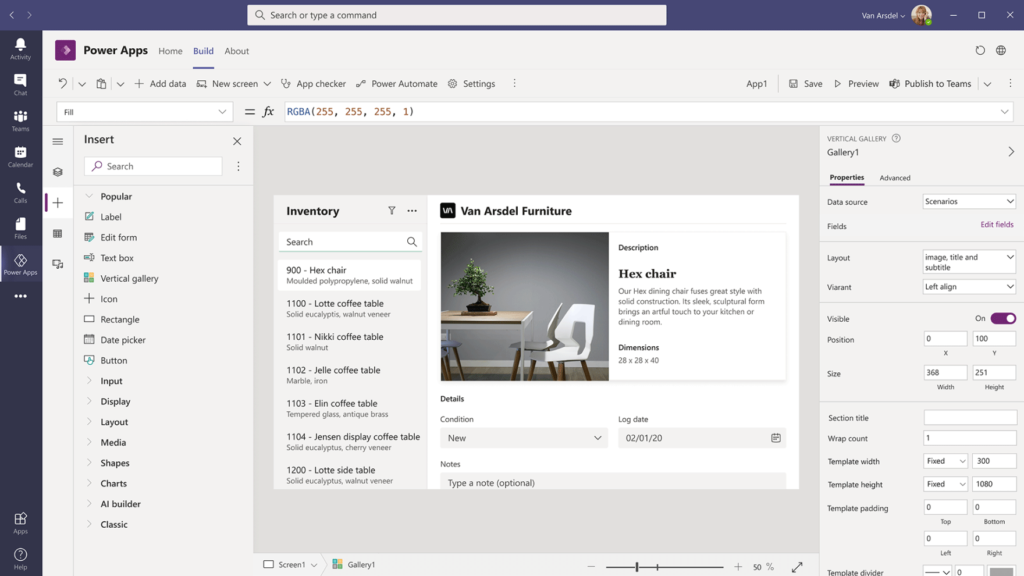
Microsoft Power Apps is a low-code application development platform that enables users to build custom apps quickly and efficiently with little to no coding experience required. It empowers organizations to create tailored solutions that streamline processes, increase productivity, and drive digital transformation.
power apps training in hyderabad

Why learn Power Apps Training in Hyderabad?

Here are some key reasons why someone should learn Microsoft Power Apps:
Accelerate App Development: Power Apps allows you to rapidly build and deploy custom apps without extensive coding, saving significant time and resources compared to traditional development approaches.
Low-Code, High Productivity:The intuitive low-code platform empowers citizen developers and business users to create powerful apps, fostering innovation and addressing specific business needs swiftly.
Integrate Seamlessly: Power Apps seamlessly integrates with Microsoft 365, Dynamics 365, Azure, and hundreds of other data sources, ensuring a cohesive and connected application ecosystem.

Power Apps Training Objectives

Learn to develop business applications using Microsoft Power Apps with minimal coding.

Simplify app development through low-code and no-code techniques.

Improve organizational efficiency with customized business app solutions.

Optimize workflows and streamline data management across departments.

Build responsive, mobile-friendly apps for web and mobile platforms.

Integrate Power Apps with Microsoft 365, SharePoint, Dataverse, and other Microsoft services.

Create real-time dashboards with rich data visualization and reporting features.

Automate repetitive tasks to increase productivity and reduce manual effort.

Enable citizen developers to build applications without deep technical knowledge.

Deploy apps quickly to support business agility and innovation.

Ensure enterprise-level security, role-based access, and compliance standards.

Reduce development time and operational costs using low-code tools.

Support team collaboration through shared access and centralized data management.

Develop scalable solutions to address specific business challenges.

Gain hands-on experience through real-time projects and practical use cases.

Career Opportunities After Power Apps Training

After completing this Power Apps Training in Hyderabad, you can apply for the following roles:

Power Apps Developer

Microsoft Power Platform Developer

Power Platform Consultant

Business Application Developer

Low-Code / No-Code Developer

Dynamics 365 Developer (Power Platform Integration)

Automation Developer (Power Apps & Power Automate)

Solution Architect – Power Platform (Entry Level)

App Support / Application Support Executive

Business Process Analyst

Tools & Technologies You’ll Master

Microsoft Power Apps (Canvas Apps)

Model-Driven Apps Development

Microsoft Dataverse

Power Automate Integration

Power Platform Admin Center

SharePoint Integration with Power Apps

Microsoft 365 Integration (Excel, Teams, Outlook)

Power Fx (Power Apps Formula Language)

REST API & Custom Connectors

Dynamics 365 Integration

Azure Services Integration (Azure SQL, Azure AD)

Responsive App Design for Mobile & Web

Power Apps Training in Hyderabad

Want to attend Demo Classes for Free? You can

CURRICULUM

  • Types of Power Apps
  • Power Apps building blocks
  • Power Apps Development Environment Setup
  • Power Apps for Admins
  • Power Apps for Developers
  • Create a blank Canvas app
  • Create an app from template
  • Create an app from a data source (sharepoint)
  • Create a Canvas app from excel
  • Explanation of Canvas App Layouts
  • Create a Blank Canvas App Types of Screens in Canvas App
  • Canvas App Screen properties Renaming & Reorder Screen
  • Navigate Functions & Its parameters
  • Notify Power Apps Functions & Its Parameters
  • Introduction to Power Apps Connectors
  • Different Types of Connectors in Power Apps
  • Build an App using MS Excel as a data source
  • Introduction to Gallery, Data table
  • Different Between Gallery & Data table
  • Different Type of Galleries in Canvas
  • Customization of the forms and Gallery controls
  • What is Search Function & its parameters
  • Implementation of search function
  • What is sort Function & its parameters
  • If – Else Condition & its Implementation
  • Nested if – Else Conditions its Implementation
  • Switch Conditions its Implementation
  • Use Cases :
    a) Modifications to data depending on user input
    b) Hide and show controls based on user inputs
  • What is Power Apps Variables
  • What are Diff types of variables in power Apps
  • Scope of Power Apps variables
  • Application of Power Apps Variables
  • Implementation of Dynamic sort
  • Creating Custom form & using patch function for submitting Data
  • Using “Updatelf” function to update a record
  • Uses of Filter, LookUp & search
  • Implementation cascading Dropdown Lists of Dynamic sort
  • What is Collection
  • How to Create and use collection(s)
  • Diff between “collect” & “Clear Collect”
  • Overview of Model Driven PowerApps
  • What is site map, how to map Dataverse table
  • Create views in model driven app
  • Create forms in model driven app
  • Business roles in model driven app
  • Create charts in model driven app
  • Create Dashboard in model driven app
  • Debug Power Apps with Monitor
  • Common Issues & Resolutions
  • Get a session or app ID
  • Change Power Apps Studio Version
  • Troubleshoot startup issues for Power Apps
  • Overview of  Dataverse
  • Different types of Tables in Dataverse
  • Create a Table in Dataverse
  • Views & Forms in Dataverse
  • Define Relationships in Dataverse
  • Use Power BI with Dataverse
  • Create Power BI Report & Dashboards
  • View Table data in Power BI Desktop
  • Adding Power BI Reports in Power Apps
  • Create Mobile & Tab views for Power BI Reports in Power Apps
  • Power Apps usage as a Visual in Power BI
  • What is Power Automate & Basic Examples
  • Calling Power Apps in Power Automate

Register for Power Apps Training in Hyderabad

Advantages of Learning Power Apps Training in Hyderabad

Low-Code Application Development: Power Apps enables you to build powerful business applications with minimal coding, making app development faster and more accessible.

Improved Business Efficiency: Organizations can streamline operations by creating customized apps tailored to specific workflows and business needs.

Rapid App Deployment: Power Apps allows quick design, development, and deployment of applications, reducing development time significantly.

Seamless Microsoft Integration: It integrates smoothly with Microsoft 365, SharePoint, Dataverse, Dynamics 365, Azure, and other Power Platform tools.

Enhanced Automation Capabilities: When combined with Power Automate, it helps automate repetitive tasks and optimize business processes.

User-Friendly Interface: Its drag-and-drop interface makes app building simple for both technical professionals and non-technical users.

Mobile & Web Accessibility: Apps built using Power Apps are responsive and accessible on mobile devices, tablets, and desktops.

Enterprise-Level Security: Backed by Microsoft, Power Apps ensures secure data access, role-based permissions, and compliance standards.

Cost-Effective Solution: Compared to traditional development, Power Apps reduces development costs while maintaining scalability.

High Career Demand: Power Apps skills are in strong demand as businesses increasingly adopt Microsoft Power Platform for digital transformation.

Why Choose Power Apps Training in Hyderabad with Vinay Tech House?

Vinay Tech House offers a complete, job-oriented Power Apps Training program in Hyderabad with real-time, hands-on learning across all Power Platform modules to make you industry-ready.

We provide industry-relevant case studies and live projects to help you understand how Power Apps is used in real business environments.

Our training sessions are customized to your schedule and delivered by experienced Power Platform professionals with strong industry expertise.

All classes are recorded and shared for future reference, allowing you to revise concepts anytime at your convenience.

We offer flexible batch timings including weekday, weekend, and fast-track options in both online and classroom modes.

Our affordable and flexible payment plans are designed to support working professionals, students, and corporate teams looking to upgrade their Power Apps skills.

Frequently Asked Questions

Imagine creating user-friendly business apps without writing a single line of code! That’s the magic of Microsoft Power Apps. It’s a cloud-based service that lets anyone, from tech beginners to citizen developers, build custom apps that solve specific business needs.

We’ve got you covered. We record Daily Live Classes and share the records everyday. You can watch at your own time, practice and ask the trainer any queries you have

Here are the key features that make Power Apps a powerful tool for building custom business applications: Drag-and-Drop Simplicity, Customizable Solutions, Rich User Interface Elements, Power Automate Integration, Cloud-Based and Scalable.

D.A.B.I. Training offers a comprehensive Power Apps course designed so you can add Power Apps to your skillset . Our training program equip you with the knowledge and skills to build impactful business apps that drive success.

The main purpose of Power Apps is to empower anyone to build custom business applications without the need for extensive coding . It’s a Microsoft cloud-based service designed for both technical and non-technical users.

PowerApps helps everyone who works with data (Excel, databases, files, cloud sources etc.) automate tasks. No coding needed. BI Analysts, admins, and even developers use it for their workflow.

Data Analysts, Data Engineers, Data Quality Specialists, Data Scientists, Data Stewards, Technical and Functional Managers, and Customers interested in generating their own customised apps.


CERTIFICATION

Certify Your Expertise with DABI

Upon successful completion of the Power BI Course, you’ll be eligible for a course completion certificate from us, recognizing your achievement and acquired skills.

adf training in hyderabad

STUDENTS SAY

pravalika
pravalika
Read More
I enrolled in this Power Apps with minimal prior knowledge but came out with a solid understanding of the framework. The hands-on approach was particularly beneficial in reinforcing theoretical concepts.

Manohar
Manohar
Read More
From fundamentals to advanced techniques, this course covered it all. The instructor was knowledgeable and helped clear our doubts with patience.

Ravi
Ravi
Read More
The course material is up-to-date and relevant to industry standards. The trainers possess deep expertise. Great value for anyone seeking to enhance their skills
Previous
Next

Power Apps Training in Hyderabad

OTHER COURSES